

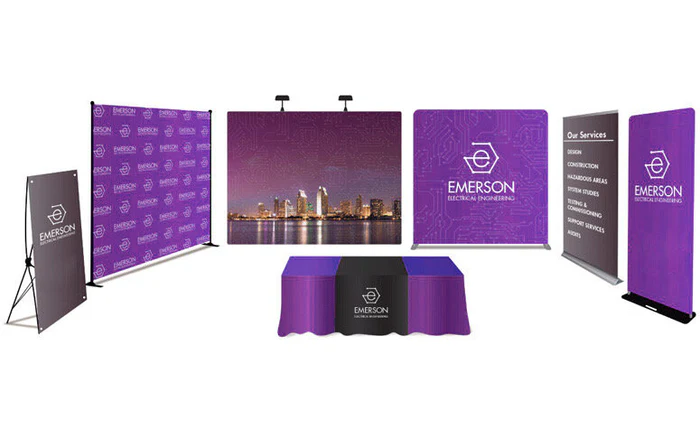
Trade shows are high-stakes. You have one shot to show up looking sharp, on-brand, and professional in a room full of competitors. The last thing you want is a blurry banner, an off-colour backdrop, or a rushed design that your team threw together the night before the event.
For print shops and in-house marketing teams, trade show display graphics come with their own set of challenges. Sizes are non-standard. File requirements are strict. Turnaround times are tight. And the volume of display types — retractable banners, backdrops, step-and-repeat prints, tabletop displays, hanging signs, and more — means that a general design tool often falls short when it is time to produce work that actually goes to print.
The right trade show display design tool handles all of this. It gives your team or your customers a way to design event graphics confidently, with accurate dimensions, real-time previews, and output files that are ready for wide format production without extra preparation.
Here are eight platforms worth looking at in 2026.
1. DesignNBuy’s Banner Design Software
For print shops and large format businesses that want to offer trade show display design as an online service, DesignNBuy provides most complete banner design software built for production. It is not a general-purpose design tool with a print export option bolted on. It is a web-to-print platform that handles the full process from customer design to print-ready file, built specifically for wide format and large format printing products.
Customers can design trade show banners, backdrops, step-and-repeat displays, retractable banners, hanging signs, and other event graphics directly on your website. The design editor supports fully custom dimensions, which matters for trade show work where standard sizes rarely apply. As customers build their design, they see a real-time preview and get live pricing updates based on size, material, and quantity. This removes the back-and-forth quoting process that slows down most event print orders.
The output is what sets it apart for production teams. DesignNBuy generates print-ready files in PDF, SVG, and PNG formats with CMYK, RGB, and SPOT colour profile support, complete with bleed and cut lines. Files go from the customer’s browser to your production floor without any manual correction or file preparation work. A built-in preflight check catches common artwork errors before the job moves to print, which is critical when trade show deadlines are tight and reprints are not an option.
The platform integrates natively with Shopify, WooCommerce, Magento, and BigCommerce, and also supports customers who prefer to upload their own artwork at checkout. For print shops managing multiple event orders at once, the job management and order dashboard keeps everything in one place.
Key features:
- Online design editor with fully custom dimensions for trade show and event graphics
- Supports retractable banners, backdrops, step-and-repeat prints, hanging signs, and more
- Live pricing engine that updates in real time as customers configure their order
- Real-time design preview before order placement
- Customer artwork upload option at checkout
- Print-ready file output in PDF, SVG, and PNG with CMYK and SPOT colour support
- Built-in preflight checks to catch errors before production
- Job and order management dashboard for multi-order visibility
- Native integration with Shopify, WooCommerce, Magento, and BigCommerce
2. Canva for Print
Canva is a widely used browser-based design tool with a large library of trade show and event display templates. It is accessible, easy to learn, and allows teams to produce good-looking graphics quickly without any design experience.
For internal marketing teams that need to create trade show display concepts or presentation mockups, Canva is a practical starting point. The template library covers banner layouts, backdrop designs, and signage formats, and the collaboration features make it easy for multiple team members to work on the same design. Where Canva falls short for print production is in output quality and file control. Print-ready file export with proper bleed, crop marks, and CMYK colour profiles requires a paid plan and still lacks the precision that large format production demands. It works well for concept creation but often needs rework before files are production-ready.
Key features:
- Large library of trade show and event display templates
- Browser-based with real-time team collaboration
- Custom dimension support for banner and display design
- PDF export with bleed on paid plans
- Accessible interface for non-designers
3. Adobe Express
Adobe Express is Adobe’s simplified design tool aimed at marketers and small business owners who want to create branded graphics without using Illustrator or InDesign. It includes templates for banners, signage, and event displays, and connects to Adobe’s asset library.
For teams already working within the Adobe ecosystem, Express offers a familiar interface and easy access to brand assets, fonts, and stock images. It is faster to use than Illustrator for straightforward banner layouts and works well for producing display concepts quickly. For print production, the same limitations apply as with Canva. Output files require additional preparation for large format printing, and there is no built-in pricing or ordering workflow for print shops to offer customers.
Key features:
- Template library for banners, signs, and event display graphics
- Adobe Creative Cloud asset and font library integration
- Brand kit support for consistent logo and colour usage
- PDF and PNG export for standard use cases
- Browser-based and mobile-accessible
4. Lucidpress (Now Marq)
Marq, previously known as Lucidpress, is a brand templating platform built for marketing teams that need to manage brand consistency across a large volume of printed and digital materials. It is used by companies that want to lock down brand elements while still giving regional teams or partners the ability to customise content within defined limits.
For trade show and event display design, Marq works well when a central marketing team needs to distribute customisable banner and display templates to sales reps, franchise locations, or regional offices. Teams can edit approved sections of a design without being able to alter logos, colours, or brand fonts. The limitation is that Marq is a brand management and template tool, not a print production platform. There is no large format printing integration, no live pricing, and output files often need further preparation before they are ready for wide format production.
Key features:
- Brand-locked templates for trade show and event display design
- Role-based editing permissions for regional and partner teams
- Template distribution across large organisations
- PDF export for print-ready output
- Digital and print asset management in one platform
5. Visme
Visme is a visual content platform that covers a range of design formats including presentations, infographics, and printed materials like banners and display graphics. It is used by marketing teams and small businesses that want a single tool for both digital and print content creation.
For trade show banner and display design, Visme offers a reasonable set of templates and a drag-and-drop editor that is easy to pick up. Custom dimensions are supported, and the platform allows brand kit integration so teams can keep logos, colours, and fonts consistent across designs. Output for large format printing is where it falls short. File export options are limited compared to professional print tools, and CMYK colour management is not a core feature. It is a capable tool for producing display design concepts but less suited to handing off production-ready files for wide format print.
Key features:
- Drag-and-drop design editor with custom dimension support
- Trade show banner and display templates
- Brand kit integration for consistent visual identity
- Export to PDF, PNG, and other standard formats
- Covers both digital and print content in one platform
6. Vistaprint Business
Vistaprint is a well-known online print service that offers trade show display products including retractable banners, fabric backdrops, tablecloths, and popup displays. Customers can upload their own artwork or use the built-in design tool to create their display graphics directly on the site.
For small businesses and first-time trade show exhibitors that want a simple, guided process for ordering event displays, Vistaprint is straightforward to use. The built-in editor covers basic text and image placement, and the product range covers the most common trade show display types. The limitation is flexibility. The design tool is built around Vistaprint’s own product templates and is not suitable for print shops looking to offer a custom or white-label large format service. It also lacks the production-level file handling and workflow tools that professional print operations need.
Key features:
- Online ordering for retractable banners, backdrops, and trade show displays
- Built-in design editor with product-specific templates
- Artwork upload option for customers with existing files
- Covers common trade show display formats
- Straightforward checkout and fulfilment process
7. BannerSnack (Now Creatopy)
Creatopy, formerly BannerSnack, is a design automation platform originally built for digital advertising banners that has expanded to include some print design capabilities. It is used by marketing and creative teams that need to produce a high volume of banner and display assets across multiple sizes and formats.
For trade show display design, Creatopy is most useful when a team needs to produce multiple size variations of the same design quickly. The resize and adapt tools make it faster to move between banner dimensions, and the brand kit feature keeps visual assets consistent. The platform is primarily optimised for digital output, and large format print file export with proper production specs is not its core strength. Teams using it for trade show print graphics typically need to do additional file preparation before handing off to a print shop.
Key features:
- Design automation for multi-size banner and display creation
- Brand kit and asset management tools
- Fast resize and adapt tools across different dimensions
- Team collaboration features for creative workflows
- Export to standard image and PDF formats
8. Printful Design Maker
Printful is a print-on-demand fulfilment platform and its built-in Design Maker tool allows customers to create artwork for a range of print products. While primarily used for apparel and merchandise, Printful does support some banner and display products through its product catalogue.
For businesses looking to sell trade show displays on a print-on-demand basis without holding inventory, Printful’s fulfilment model is its main draw. The Design Maker tool is functional for basic banner and display customisation, though it is limited in scope compared to dedicated large format design platforms. Custom dimensions outside of Printful’s standard product sizes are not supported, and the tool is optimised for Printful’s own fulfilment workflow rather than for print shops running independent production.
Key features:
- Print-on-demand banner and display products with no inventory required
- Browser-based Design Maker tool for basic artwork customisation
- Integrates with Shopify, WooCommerce, and Etsy
- Handles fulfilment and shipping directly
- Suitable for businesses selling printed products without a production setup
Which Platform Is Right for Your Trade Show Print Needs?
The tools on this list serve very different purposes. General design platforms like Canva, Adobe Express, and Visme work well for creating trade show display concepts and internal marketing assets. Brand management tools like Marq are useful for large organisations that need to distribute editable templates to remote teams. Print-on-demand services like Printful and Vistaprint handle simple event display orders for small businesses.
What most of them do not do is connect a professional online design experience to a real large format production workflow, with live pricing, print-ready file output, and order management built in.
For print shops and large format businesses that want to offer trade show display design as a proper online service, DesignNBuy is the only platform on this list that covers the full process. Customers design on your website, get accurate pricing, and submit files that go directly to wide format production without any extra steps. For businesses where trade show print is a real product line rather than an occasional order, that end-to-end capability is what makes the difference.