


Key takeaways:
● AR training directly bridges the gap between theoretical knowledge and practical, on-the-job application.
● Implementing these systems successfully requires clear educational objectives and the right hardware selection.
● Tracking specific performance metrics guarantees a strong return on your corporate education investments.
Corporate education has shifted dramatically from standard paper manuals to highly interactive digital experiences. Organizations are actively searching for methods that improve knowledge retention while keeping employees genuinely engaged. One of the most effective solutions available in the modern business landscape is AR training. By overlaying digital information onto the physical workspace, employees learn directly in their actual work environment. This guide will walk you through the exact steps needed to bring this technology into your organization successfully.
Grasping the Basics: What is AR training
Before launching a new initiative, your leadership team must understand the underlying mechanics of the technology.
What is AR training specifically? Augmented reality training involves projecting digital elements—such as 3D models, text, or interactive prompts—into the learner’s real-world view. This allows staff members to practice complex procedures safely without the risks associated with live operations.
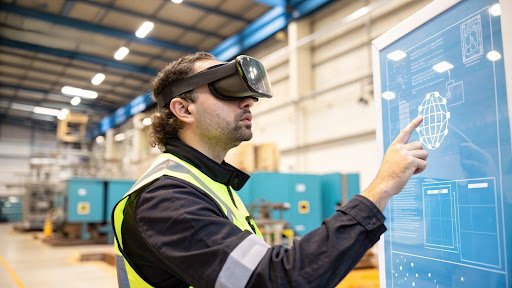
Unlike virtual reality, which completely immerses a user in a fabricated digital world, AR reality keeps the user grounded in their actual physical surroundings. This distinction makes the technology highly practical for on-the-job instruction and immediate mechanical troubleshooting. Employees can wear smart glasses or use standard tablets to see step-by-step instructions overlaid directly on the machinery they are repairing. As a result, the learning process becomes highly practical and immediately applicable to their daily tasks.
Top Advantages of AR Training for Corporate Teams
The shift toward digital onboarding is not just an industry trend; it delivers measurable and immediate business outcomes. When you introduce AR training for corporate environments, you typically notice an immediate spike in employee engagement and participation. Traditional classroom settings often lead to learner fatigue, whereas interactive digital overlays keep individuals focused and physically active.
Another major benefit is the massive reduction in workplace accidents and expensive equipment damage. Trainees can manipulate costly machinery virtually before ever touching the physical controls on the factory floor. This creates a safe educational sandbox where mistakes become helpful learning opportunities rather than costly industrial disasters.
Furthermore, this instructional approach significantly accelerates the time it takes for new hires to reach full productivity. Because workers learn by doing, their physical muscle memory and cognitive recall improve simultaneously. Companies leveraging augmented reality training consistently report higher confidence levels among their staff right from their first week on the job.
A Practical Blueprint for AR Training for Enterprise
Rolling out an organization-wide educational program requires careful logistical planning and strategic execution. You cannot simply purchase expensive hardware and expect your workforce to adapt automatically to new processes. A structured, phased approach guarantees high adoption rates and a solid return on your financial investment.
Step 1: Define Clear Educational Objectives
Start by identifying the exact skills your employees lack or the specific workplace procedures that cause the most errors. Are you trying to improve safety compliance, speed up assembly line work, or enhance technical support skills? Pinpointing these exact goals helps you design a curriculum that directly impacts your bottom line. Ensure that every piece of digital content you create aligns perfectly with these overarching business objectives.
Step 2: Select Appropriate Hardware and Platforms
The success of AR training for enterprise largely depends on the physical tools you provide to your workforce. For hands-free industrial operations, smart glasses offer the best experience, allowing workers to use both hands while receiving visual instructions. However, if budget is a primary constraint, standard company tablets and smartphones also serve as excellent delivery devices.
You must also choose a software platform that matches your internal technical capabilities and IT resources. Some platforms require heavy coding knowledge, while others offer highly intuitive drag-and-drop design interfaces. Select a system that your instructional designers can navigate independently without requiring constant support from your engineering department.
Step 3: Develop Engaging and Accurate Content
Content is the absolute heart of any educational initiative you launch. Work closely with your internal subject matter experts to capture the exact steps required for various workplace tasks. Translate these documented steps into clear visual prompts, 3D animations, and interactive knowledge checks.
Avoid overwhelming the learner with too much digital information on the screen at once. Keep the visual overlays clean, direct, and completely focused on the immediate task at hand. Testing the content with a small pilot group before a full corporate rollout helps identify any confusing elements or technical glitches early on.
Overcoming Common Implementation Roadblocks
Transitioning to advanced educational tools often comes with a few predictable internal challenges. Employee resistance to new technology is common, especially among veteran staff members who are used to traditional methods. To counter this, introduce the AR training modules gradually, starting with departments that are naturally inclined toward digital tools.
Network connectivity can also pose an issue in large warehouses or remote field locations. Ensure your chosen software allows for offline capabilities so workers can download modules ahead of time. This guarantees that learning can happen anywhere, regardless of Wi-Fi signal strength.
Finally, provide comprehensive technical support during the initial launch phase to reduce frustration. Assign dedicated champions within each department who can assist their peers with hardware setup and software navigation. When employees feel supported, they transition much more smoothly into these new ways of working.
Measuring the Impact of Your AR Training Program
To justify the initial financial investment, you must track specific, measurable performance indicators continuously. Monitor module completion rates, internal assessment scores, and the average time it takes an employee to finish a specific lesson. These data points reveal exactly how effectively your workforce is absorbing the new material.
Beyond the internal software analytics, look at real-world performance metrics on the factory floor or in the main office. Are daily error rates dropping noticeably across your teams? Is machinery downtime decreasing because maintenance staff are better prepared? Correlating these tangible business metrics with your augmented reality training efforts proves the true value of the entire initiative.
Conclusion
Upgrading your corporate education strategy requires forward-thinking solutions that prioritize active, hands-on participation. Implementing AR training offers a highly effective way to enhance skill acquisition, reduce workplace errors, and keep your workforce fully engaged. By defining clear goals, selecting the right hardware, and designing focused content, any organization can build a powerful learning environment. Start with small pilot programs, track your performance data closely, and gradually expand your efforts to transform professional development in 2026.